Yes, an Apple Watch can work surprisingly well as an iPod-style music player. Download your albums, playlists, podcasts and audiobooks to the Watch, pair a set of Bluetooth headphones, and you can listen without carrying your iPhone at all. The experience becomes even more iPod-like once you move the Watch off your wrist and into a pocket-friendly case such as the TechPod RePod, which changes how you carry and physically control it.
⚡Quick Comparison MatrixClick to ExpandAt a Glance: Apple Watch iPod-Style Music Player Setup
Expand TableCollapse Table
At a Glance: Apple Watch iPod-Style Music Player Setup
| Product | Best For | Regional Models & Pricing Snapshot | Core Specs & Highlights | Friction Point Solved |
|---|---|---|---|---|
| TechPod RePod Apple Watch iPod Case | Retired or spare Apple Watches, phone-free workouts, walking and music-first everyday carry | US: RePod C1 case · UK: RePod C1 case · DE/FR/IT/ES: RePod aluminium case — offered in multiple sizes matching recent Apple Watch generations (verify your exact generation and case size before ordering; price varies by size and model) | CNC-machined aluminum enclosure, external wheel mechanically linked to the Digital Crown, unobstructed rear opening for magnetic wireless charging, pocket-oriented layout | Gives a working-but-unworn Apple Watch a phone-free, tactile, handheld music-player form |
Prices & availability subject to change. Affiliate links may earn a commission at no extra cost to you.
Can You Actually Use an Apple Watch Like an iPod?
Short answer: yes for playback, with one practical condition. Anything you have downloaded to the Watch keeps working when the iPhone is left behind, so the experience is genuine — but it is offline-first rather than fully independent.
What Works Without Your iPhone
- Music, playlists, podcasts and audiobooks that have already been downloaded to the Watch
- Bluetooth headphones paired directly to the Watch
- Apple Pay, calendar, alarms, timers and workouts
- Heart rate and other on-watch health measurements
What Still Needs Wi-Fi, Cellular, or Your iPhone
- Streaming music that has not been downloaded
- Messages, Mail and app installs
- Weather, stocks and most third-party apps that depend on a live connection
An Apple Watch is not a literal iPhone replacement, and it should not be described as completely autonomous. Treat it as a dedicated player that happens to also tell the time.
Three Ways to Turn an Apple Watch Into an iPod-Style Player
1. Keep the Watch on Your Wrist
The simplest route needs no accessories at all: Apple Watch plus downloaded music plus Bluetooth earbuds. It works, but the screen still lives on your wrist, and the whole point of an iPod was holding a single-purpose device in your hand.
2. Put the Watch Into a Pocket-Friendly Case
This is where the TechPod RePod enters. Sliding a compatible Apple Watch into the aluminum enclosure converts it from wristwear into a small handheld player with a real scroll wheel — much closer to the original iPod ritual of thumbing through a playlist.
3. Build a Dedicated Phone-Free Music Setup
The most deliberate version combines an offline library, Bluetooth headphones and a case, leaving the iPhone at home or in a locker. This is the setup covered in detail below.
How to Set Up an Apple Watch for Phone-Free Music
Step 1 — Choose Your Music Source
Apple Music supports downloading playlists, albums and podcasts to the Watch. Spotify supports offline downloads on Apple Watch for Premium subscribers on a compatible watch model and recent watchOS. Local music apps vary, so confirm offline sync support before relying on one.
Step 2 — Download Your Music
On the Watch, open the music or podcast app, choose the album or playlist and select the download option. Downloads use Wi-Fi, so start them at home rather than on the move, and check the Watch has enough free storage.
Step 3 — Pair Bluetooth Headphones
Put your headphones in pairing mode and connect them from Settings → Bluetooth on the Watch. Once paired, audio routes to them automatically without touching the iPhone.
Step 4 — Test Everything Before Leaving Your iPhone Behind
Play a downloaded track, skip a few songs, adjust the volume and confirm the headphones reconnect after a short break. Two minutes of testing at home prevents a silent workout.
What You Need for a Phone-Free Apple Watch Music Setup
| What You Need | Why It Matters |
|---|---|
| Apple Watch | The actual music player, screen and storage |
| Downloaded music | Enables offline playback without a phone or Wi-Fi |
| Bluetooth headphones | How you actually hear the audio |
| Wi-Fi | Needed to sync or download before you leave |
| A music service | Apple Music, or Spotify with a Premium plan for offline use |
| Optional pocket case | Turns the Watch into a handheld, iPod-like device |
What Does the RePod Case Actually Change?
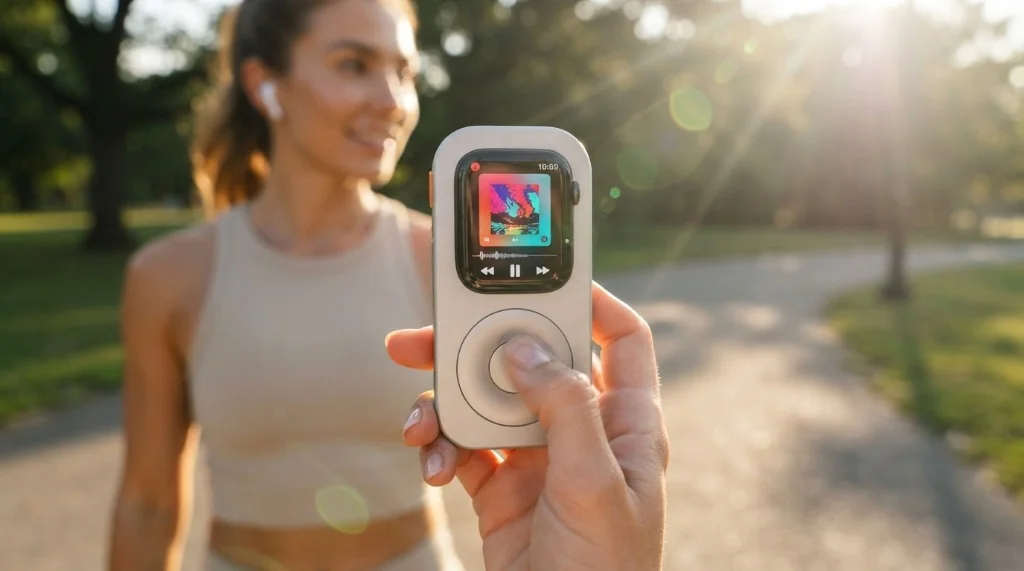
The RePod does not create the music function — Apple Watch already plays downloaded audio on its own. What it changes is the physical experience: it moves the Watch off the wrist and into a machined aluminum shell shaped like a classic portable player, then puts a real wheel under your thumb.
The feeling it adds: The cool, solid weight of metal in the hand and the familiar ritual of scrolling through a playlist with a physical wheel, rather than tapping a watch face strapped to your arm.
Key Design & Functional Highlights:
- External wheel linked to the Digital Crown: The outer wheel turns the Watch's Digital Crown mechanically, giving tactile control of volume and menu scrolling in supported apps. The center circle is a decorative nod to the classic player and does not press the screen.
- CNC-machined aluminum: A precision-milled metal enclosure rather than a flexible silicone sleeve, with a matte finish that feels substantial and protects against everyday knocks.
- Pocket-oriented layout: With the straps removed, the whole unit becomes a small, flat handheld device that slides into a jacket or trouser pocket.
- Charging and contactless access retained: A rear opening keeps the watch's magnetic charging back clear, and a side-button cutout keeps Apple Pay reachable.
Regional Model Comparison & Practical Notes
- US and UK selection: Buyers typically pair the enclosure with an older GPS Apple Watch used purely as a player; a cellular model is optional and only adds standalone calling and streaming away from Wi-Fi.
- DE/FR/IT/ES selection: Runners and digital-minimalist buyers lean on offline Spotify and Apple Music libraries and treat the case as a wrist-free commuter player. Sizing across European listings follows the same millimeter convention as the Watch itself.
- Practical notes: Remove the band before inserting the Watch, start the wheel with a few gentle turns, and set the Watch orientation so the Digital Crown lines up with the wheel. Because the Watch is no longer on skin, adjusting wrist detection removes repeated passcode prompts.
Before adding it: The RePod is an enclosure, not a standalone device — it has no electronics, battery or storage of its own, and the installed Apple Watch provides the music, apps and connectivity. Compatibility spans several Apple Watch generations and sizes, but not every combination, so match your Watch's generation and the millimeter size printed on its back against the current selector before ordering.
Shop this find:
- View on Amazon US
- View on Amazon UK
- View on Amazon DE
- View on Amazon FR
- View on Amazon IT
- View on Amazon ES
RePod Features That Actually Matter
External Wheel & Digital Crown Control
The wheel is a true mechanical link to the Digital Crown, not a decorative sticker. That single detail is what separates the RePod from a plain shell and delivers the muscle memory iPod owners still remember.
CNC-Machined Aluminum Construction
Machined aluminum gives the enclosure rigidity and a solid in-hand feel that flexible plastic and 3D-printed shells cannot match. It also provides real protection for a Watch that would otherwise sit in a drawer.
Wireless Charging Support
A rear cutout leaves the charging back accessible, so the Watch can be charged on a standard magnetic puck without being removed from the case.
Pocket-Oriented Design
The proportions are tuned for a hand and a pocket rather than a wrist, which is the entire reason a smartwatch starts to feel like a dedicated player.
RePod Compatibility
Techpod's current lineup covers multiple Apple Watch generations and case sizes rather than the single 44 mm configuration that appeared in earlier coverage. Because the mapping between generation and millimeter size is not one-to-one, check the current compatibility selector for your exact Apple Watch generation and case size before ordering, and use the millimeter figure engraved on the back of your Watch as the reference.
How to Configure RePod for Pocket Use
- Wrist orientation: Set the orientation so the Digital Crown aligns with the external wheel; this is the setting that makes the wheel feel natural.
- Wrist detection: With the Watch off-skin, wrist detection causes repeated passcode prompts. Adjusting or disabling it keeps the screen responsive — treat this as a convenience tweak rather than a strict requirement.
- Wake on wrist raise: Less useful once the Watch leaves the wrist; waking on button or wheel press is more predictable.
- Always-On Display: Turning it off extends battery life for a device that is now mainly a player.
What You Can Still Do Without Your iPhone
| Function | Works Offline on Watch | Needs Wi-Fi / Cellular / iPhone |
|---|---|---|
| Downloaded music & podcasts | Yes | — |
| Audiobooks | Yes | — |
| Bluetooth headphone playback | Yes | — |
| Apple Pay | Yes | — |
| Workouts & heart rate | Yes | — |
| Streaming new music | — | Yes |
| Messages & app installs | — | Yes |
Is RePod Actually Worth It?
Worth Considering If
- You already own an older, compatible Apple Watch that no longer gets worn
- You want phone-free music and fewer reasons to reach for your phone
- You like tactile, physical controls and retro hardware
- You want a pocketable, single-purpose player
Probably Unnecessary If
- You are happy wearing the Watch on your wrist
- You only want offline music and do not care about the handheld form
- You dislike extra bulk or a case around your Watch
Apple Watch vs. a Real iPod
An Apple Watch is not literally an iPod. It is a smartwatch that can reproduce much of the iPod experience — offline playback, Bluetooth headphones, a physical scroll wheel once it is inside a case — while also adding modern features such as Apple Pay, workouts and health tracking. If the goal is the retro pocket-player feeling with current-day capability, the case route is the closer match; if the goal is pure nostalgia on a shelf, nothing beats the original hardware.
Final Thoughts & Buying Guide
The music capability is already inside the Watch; the case is what makes it feel like a player. Buy the RePod only if you are matching it to a compatible Watch you already own and you specifically want the handheld, wheel-driven experience. If you simply want offline music for runs, a paired pair of Bluetooth headphones and a downloaded library may be all you need. Either way, verify your Watch generation and case size first, and download your library before you leave the house.
Frequently Asked Questions
Can an Apple Watch work like an iPod?
Yes. A downloaded library plays through Bluetooth headphones with no iPhone nearby, which covers the core iPod use case. The Watch still depends on downloads for offline listening and is not a full phone replacement.
Can I listen to music without my iPhone?
Yes, for anything already downloaded to the Watch. Streaming, messages and app installs still need Wi-Fi, cellular or the paired iPhone.
Can Apple Watch play Spotify without a phone?
Spotify supports offline downloads on Apple Watch for Premium subscribers on a compatible watch model and recent watchOS. Downloaded content and podcasts play over paired Bluetooth headphones without the phone.
Do I need a cellular Apple Watch for offline music?
No. Offline playback works on GPS-only models. A cellular model only adds standalone calling and streaming when you are away from Wi-Fi and your phone.
Can I use AirPods directly with Apple Watch?
Yes. AirPods and other Bluetooth headphones pair directly with the Watch, and audio routes to them without the iPhone.
What Apple Watch models work with RePod?
Compatibility spans several recent Apple Watch generations and case sizes rather than one fixed configuration. Check the current Techpod compatibility selector against the generation and millimeter size of your Watch before ordering.
Is RePod worth buying?
If you own a compatible Watch you no longer wear and want a tactile, pocketable player, it is a reasonable way to reuse it. If you are happy wearing the Watch or only need offline audio, it is optional.